
Stuck in Drink the Ocean? The Five Problems We Actually Hit
Five things went wrong while we were testing the browser build, and each one has a specific cause. None of them were bugs in the game — all five were things we were doing wrong, which is why they are worth writing down.
1. You can see water but the drink prompt is gone
The prompt only appears when you are actually able to drink. Two things block it.
Your belly is already full. Check the meter at the top left. At 10/10 L there is nothing to do but walk back to the press. This caught us on the very first trip, because a full meter looks exactly like a meter that is not working.
You are not close enough, or you are aiming too high. Walk a little closer to the water and aim lower, toward the surface, until the green crosshair returns. The prompt follows the crosshair, so if you are looking at the horizon it will not appear.
2. You drank water but your salt did not go up
This is the most common one, and it is not a bug. Drinking does not earn salt. It only fills the belly meter. Salt appears at one place only: the press on the beach.
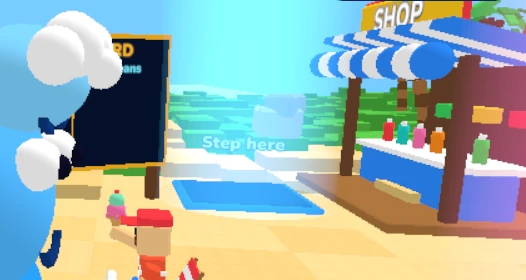
To get paid, walk back onto the sand, find the dark pad with the yellow-and-black edging, and stand directly under the red press head. If the belly meter stays full, step further onto the pad until it starts draining. Wait until it reaches 0/10 L and check the counter before you leave — in our 16 November test a full 10 L load paid 15 salt, and the number appears above the crosshair when the press finishes.
One way to avoid this entirely: when you own the Recall Ring, press T while full and you land beside the press instead of walking.
3. WASD scrolls the page instead of moving
The game is inside an embedded player, and the keyboard only goes to it when the player has focus. Click once inside the game area, then try again. That single click fixes it almost every time.
While you are in there: the game shows Tab: free the mouse while it controls your cursor. If you need the cursor back for a browser button or another tab, use Tab or Esc, do your thing, then click inside the game to hand control back. If you come back from another tab and the camera will not move, that is the same focus issue — click inside the player first.
On a phone or tablet the equivalent problem is touch. The touch layout uses a joystick to move, a swipe to look around, and an on-screen DRINK button at the water. If taps do nothing, rotate to landscape and make sure you are tapping inside the player, not the page around it. The mobile guide goes through the touch layout in more detail.
4. The loading screen never clears
Reload the page once. That is the whole fix for the overwhelming majority of cases, and it is what Playgama's own troubleshooting amounts to.
If it still hangs after a reload, open the Playgama listing for the same game in the same browser. That tells you where the problem lives:
- It loads there but not here → the embed on this page is the problem. Try a different browser, or a different network if you are behind a strict firewall.
- It fails in both places → it is not this site. The game's own hosting is having a bad moment, and waiting is the only useful move.
What we do not recommend: turning off your ad blocker globally, installing a “game booster”, or downloading anything. A browser game that needs an installer is not this game.
5. The camera stops following the mouse
Two causes, both boring.
The first is focus again: you clicked outside the player, so the game stopped receiving mouse movement. Click inside it.
The second is the mouse-free toggle. If you pressed Tab or Esc deliberately, the cursor is free and the camera will not turn until you click back in. There is nothing broken; you are simply in the state the button was designed to put you in.
The one-line version
| What you see | What to do |
|---|---|
| No drink prompt | Check the belly meter; move closer and aim lower |
| Water drunk, no salt | Stand under the red press head on the dark pad until the meter empties |
| WASD does nothing | Click once inside the game to give it keyboard focus |
| Loading screen stuck | Reload once, then test the Playgama listing to see whose side it is on |
| Camera will not turn | Click inside the player; you probably freed the mouse with Tab or Esc |
If you hit something that is not on this list, the contact page reaches a real person. Include your browser, whether you are on desktop or phone, and what the screen looked like — those three details are enough to reproduce most problems. For the basics from the start, read how to play; for prices and priorities, the upgrades guide.