
Drink the Ocean on Android & iPhone: No APK, No Download
Free in your browser — no APK, no install, no Steam.
Play the browser versionShort answer: looking for a Drink the Ocean APK or a download? There is no official one — the game runs in your phone's browser.
- APK: there is no official APK file for Pinidi Studio's version. Anything offered as an APK is a copy, not the game.
- App store: no official Android or iOS listing as of November 20, 2026.
- Download: not needed. Open the game here, turn the phone sideways, and play.
You can play the Pinidi Studio version of Drink the Ocean in a supported mobile browser. Open the game, turn your phone sideways, and tap Play the browser version. You can start without downloading an app or installing Steam.
Do I need to download Drink the Ocean on my phone?
No. Open the Playgama browser version from this site. The player may show its own loading screen, ads or prompts before you enter the game.
We found no official standalone app or APK for Pinidi Studio's Drink the Ocean. If you see an app with the same name, check the developer credit and look for a link from Pinidi Studio or Playgama before installing it.
How to tell a real Drink the Ocean page from an APK download
- Check the studio credit. The browser game is credited to Pinidi Studio and hosted by Playgama. A store listing that names a different developer is a different game.
- Check what it asks of you. This version opens in a web page. Anything that makes you install a file first, or asks for permissions a browser game has no use for, is not the official route to it.
- Start from this page, not from a download site. Search results that offer an "APK" or a "mod" are pointing at copies. The free player is already on this page.
Still true as of November 20, 2026: no official app store listing for this game.
How do you play Drink the Ocean on a phone?
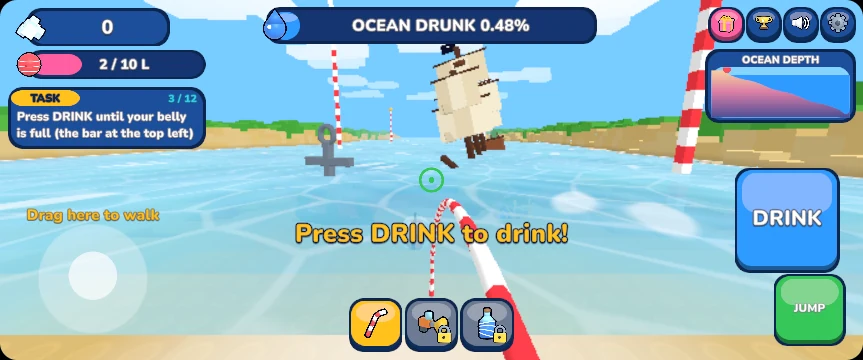
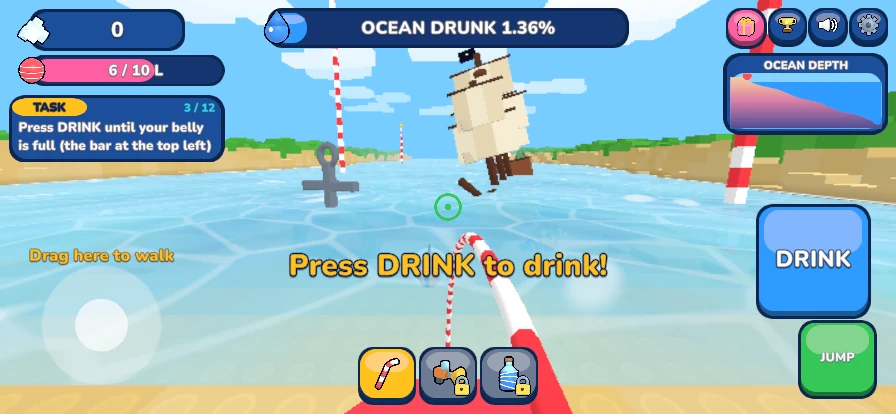
Drag the joystick on the left to walk and swipe across the game view to look around. At the shoreline, aim the crosshair at the water. When you see Press DRINK to drink!, tap the blue DRINK button on the right. Tap again between sips until the meter in the top left is full. Then walk back to the beach press and stand underneath it to turn the water into salt.
In a fresh run on November 16, 2026, tapping DRINK once raised the belly meter from 0/10 L to 2/10 L. We checked the controls in Chrome's Android phone emulation.
Should you play in portrait or landscape?
Turn your phone sideways and tap Fullscreen below the player if parts of the game are cut off. In our Android browser test, that put the joystick, view and DRINK button on screen at the same time. On a computer, WASD replaces the joystick, mouse movement replaces swiping, and a left click replaces the DRINK button.
Can I play on an iPhone?
Playgama lists the game for mobile browsers. On an iPhone, try opening the player in an up-to-date Safari window and turning the phone sideways. Fullscreen availability depends on the browser. The walkthrough above was tested on Android emulation.
What if the game loads slowly or lags on my phone?
Give the first load a moment. If it stalls, reload once on a stable connection. If the game opens but responds slowly, close other tabs and apps and try again. If the embedded player still does not open, try the direct Playgama listing in the same browser. The five problems we actually hit covers the loading screen and the controls that stop responding.
What about an iPad or an Android tablet?
A tablet gives the game noticeably more room in landscape than in portrait. Rotate the device, tap Play the browser version, then use Fullscreen below the player if your browser offers it. The touch layout is the same as on a phone: joystick on the left, DRINK on the right. On iPadOS, Safari hides the fullscreen control on some pages — if you cannot find it, tap the player once and zoom out to see more of the screen at a time.
Our checks were run in Android phone emulation rather than on a physical tablet, so treat the tablet layout as untested. Expect the on-screen buttons to sit closer together than they do on a large phone, and use landscape if the portrait view feels cramped.
Where to go next
Step-by-step controls and the first salt trip covers keyboard and touch input, the route to the press, and four fixes for when drinking stops working.
Drink the Ocean upgrade prices and buying order lists all six first-level upgrades and what a 15-salt load buys.
Whether Drink the Ocean is on Steam explains the four checks you can repeat, the Deck notes, and how to tell the two games apart.
The Roblox game with the same name is a different game — that page shows which one you were watching.
How much salt one full trip actually pays has the measured 15 and 18.8 figures behind these tips.